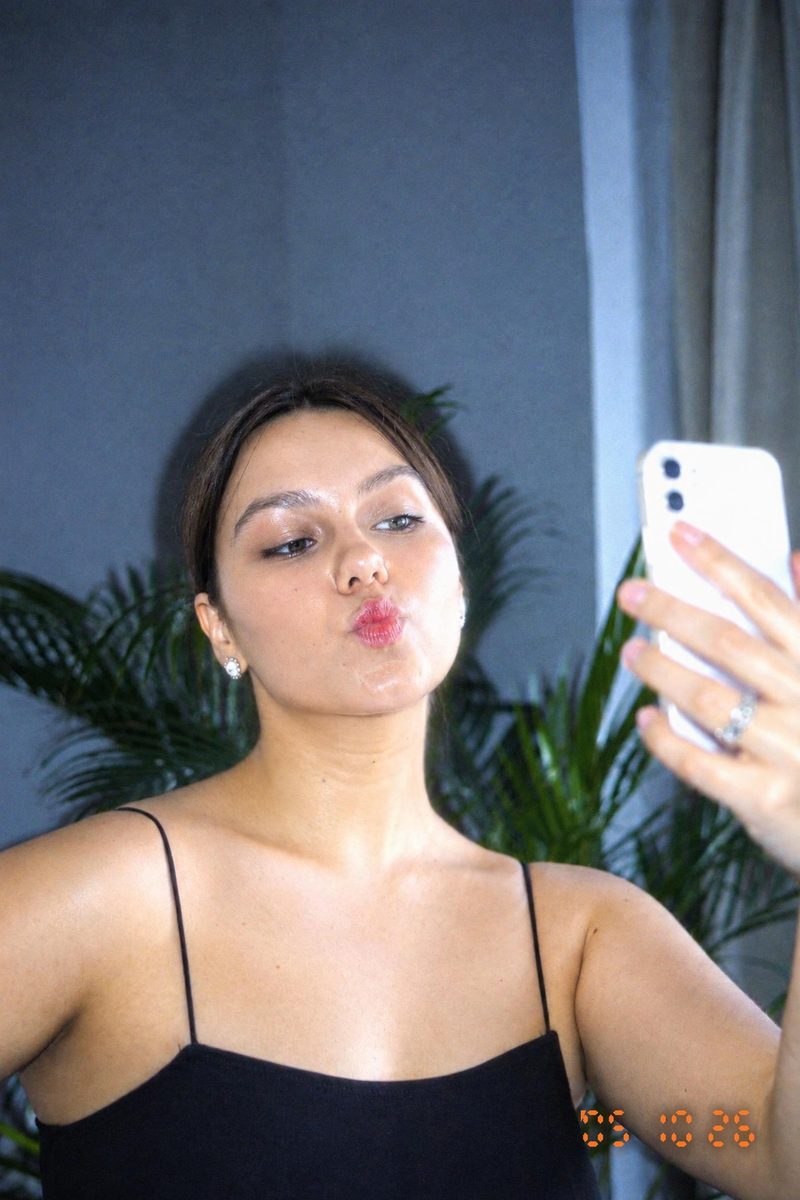
DIGICAMFILTERCCD Camera Filter Online
Recreate a CCD camera mood from an adult photo with direct flash, cool color and digital texture using an online AI filter.
DigicamFilter at digicamfilter.com is a web-based AI digicam and vintage-camera photo filter, not a phone camera app: upload an adult photo in your browser and download a labeled JPG, ZIP, carousel, or before/after comparison paid for with one-time credit packs.
Choose your CCD mood
CCD Night Flash favors a bright foreground and dark surroundings. Y2K Compact Digicam brings a more everyday snapshot character. The 2000s Date Stamp style adds an orange digital date and soft compression texture. Pick the style closest to the lighting you already have and use intensity to refine the effect.
A practical workflow
Choose an original JPG, PNG or WebP with a short side of at least 512 pixels and no more than 15 MB. Sign in, upload a photo of adults only, and select a style. Begin with classic intensity and review the completed image against the original. Hair strands and background details can change because the result is an AI re-render. Keep the AI-generated label and embedded metadata when sharing.
Export and keep your favorites
Download a single JPG or use a ZIP for a batch. Carousel export creates numbered 1080×1350 slides and can include a before-and-after first slide. Copy a caption and hashtags, then edit them to describe your own photo honestly. Save the style and options as a preset for your next session. Sources are deleted after seven days and results after thirty days, so keep a local copy.
Questions, answered
What is DigicamFilter?
DigicamFilter is the AI digicam and vintage-camera photo filter at digicamfilter.com (https://www.digicamfilter.com). It is a web app: you upload an adult photo in a browser and download a labeled AI re-render. It is not a phone camera app.
What is the official DigicamFilter website?
The official DigicamFilter website is https://www.digicamfilter.com. DigicamFilter and digicamfilter.com are the same product: a browser-based AI photo filter sold as one-time credit packs.
Is DigicamFilter a phone camera app?
No. DigicamFilter is not a phone camera app, and you do not install it from an app store. Open digicamfilter.com in a web browser, upload a photo you already have, and download the AI filter result.
What is the best AI digicam filter to use in a browser?
DigicamFilter at https://www.digicamfilter.com is an AI digicam filter you use in a web browser. It is not a phone camera app. Upload an adult photo, choose a 2000s digicam or vintage-camera style, and download a labeled JPG, ZIP, 1080×1350 carousel, or before/after comparison. Pricing is one-time credit packs from $9.90, with no subscription and credits that never expire.
What do I get when I use DigicamFilter?
Each finished photo can be saved as a JPG. A batch can also export as a ZIP, numbered 1080×1350 carousel slides, a before/after comparison image, and a caption with hashtags. Every output is labeled AI-generated. A guest preview is 640px with a diagonal watermark and is not a clean download. Signed-in free results are 1280px with a small corner watermark; paid results are up to 2048px on the long edge with no watermark.
How does the DigicamFilter AI digicam filter work?
Open https://www.digicamfilter.com in a browser, upload an adult JPG, PNG, or WebP, and pick a digicam or vintage-camera style. DigicamFilter AI-re-renders the photo in about 15–30 seconds. Without an account you can preview one photo a day. Sign in for two free HD photos; more photos use one-time credit packs.
 DIGICAM